Programmation » Framework SLIM MVC
Framework SLIM MVC
Publié le 14/05/2016 @ 11:00:07,
Par kezaBonjour,
Je suis nouveau et je suis en train de faire une api en utilisant le framework slim j'ai du mal pour sélectionner une ligne dans un tableau pour pouvoir les afficher dans les champs:
Quelqu'un pour m'aider ..... je vous remercie de votre aide
index.php
----------------
Model.js
----------------------
Controller.js
-------------------
Vieuw.js
---------------------
table.html
--------------------
Dernière édition: 17/05/2016 @ 15:50:09
Je suis nouveau et je suis en train de faire une api en utilisant le framework slim j'ai du mal pour sélectionner une ligne dans un tableau pour pouvoir les afficher dans les champs:
Quelqu'un pour m'aider ..... je vous remercie de votre aide
index.php
----------------
- <?php
- // include
- require 'Slim-2.6.0/Slim/Slim.php';
- require './models/model.php';
- \Slim\Slim::registerAutoloader();
- $app = new \Slim\Slim();
- $app->get('/contacts(/:id)', 'getContacts');
- $app->delete('/contacts/:id','deleteContact');
- $app->put('/contacts/:id','updateContact');
- $app->run();
- function getContacts($id=null) {
- $response=\Slim\Slim::getInstance()->response();
- $response->headers->set('Content-Type', 'application/json');
- if (!isset($id)){
- $response->setStatus(200);
- echo json_encode(Contacts::find_array());
- }
- else
- {
- if ($contact = Contacts::find_one($id))
- {
- $response->setStatus(200);
- echo json_encode($contact->as_array());
- }
- else
- $response->setStatus(404);
- }
- }
- function deleteContact($id) {
- $response=\Slim\Slim::getInstance()->response();
- $response->headers->set('Content-Type', 'application/json');
- $contact = Contacts::find_one($id);
- if ($contact) {
- $contact->delete();
- $response->setStatus(200);
- }else{
- $reponse->setStatus(404);
- }
- }
- function updateContact($id) {
- $response=\Slim\Slim::getInstance()->response();
- $response->headers->set('Content-Type', 'application/json');
- $contact = Contacts::find_one($id);
- if ($contact) {
- $contact->delete();
- $response->setStatus(200);
- }else{
- $reponse->setStatus(404);
- }
- }
- ?>
Model.js
----------------------
- $.extend({
- Contact:function(id,nom,prenom,email){
- this.data={
- "id":id,
- "nom":nom,
- "prenom":prenom,
- "email":email
- };
- }
- });
- $.Contact.getAll=function(f){
- $.getJSON("/contacts/rest/contacts",null,function(data){
- var items=[];
- $.each(data,function(i,el){
- items.push(new $.Contact(el.id,el.nom,el.prenom,el.email));
- });
- f(items);
- });
- };
Controller.js
-------------------
- $.extend({
- Controller:function(view,contacts){
- var that=this;
- this.selection=null;
- contacts.getAll(
- function(items){
- view.updateTable(items);
- });
- }
- });
Vieuw.js
---------------------
- $.extend({
- View:function(){
- var form=$('#form');
- var table=$('#ct');
- var moi=this;
- this.sel=null;
- this.updateTable=function(contacts){
- var matable=$("#ct").children("tbody").empty();
- $.each(contacts,function(i,contact){
- matable.append("<tr data-id='"+contact.data.id+"'>"
- +"<td>"+contact.data.nom+"</td>"
- +"<td>"+contact.data.prenom+"</td>"
- +"<td>"+contact.data.email+"</td>"
- +"</tr>"
- );
- });
- };
- this.listeners={
- clickAjouter:function(){},
- clickEditer:function(){},
- clickSupprimer:function(){},
- clickSelection:function(){},
- clickDeselection:function(){}
- }; // listeners vide par défaut, que le
- // controleur complétera pour etre notifié
- // des événements dans la vue.
- }
- });
table.html
--------------------
- <html lang="en">
- <head>
- <meta charset="UTF-8" />
- <title></title>
- <link href="./css/bootstrap.css" rel="stylesheet" />
- </head>
- <body>
- <div class="container">
- <div class="row">
- <div class="span8">
- <h4>Liste des contacts </h4>
- <hr>
- <table id="ct" class="table table-hover table-striped table-bordered table-condensed" cellspacing="0">
- <thead>
- <tr>
- <th>Nom</th>
- <th>Prénom</th>
- <th>Email</th>
- </tr>
- </thead>
- <tbody>
- </tbody>
- </table>
- <nav></nav>
- </div>
- <div class="span4">
- <form id="form">
- <h4>Contact</h4>
- <hr>
- <label>Prénom</label>
- <input id="prenom" name="prenom" placeholder="Prénom" type="text">
- <label>Nom</label>
- <input id="nom" name="nom" placeholder="Nom" type="text">
- <label>Email</label>
- <input id="email" name="email" placeholder="Email" type="text">
- <br>
- <button id="supprimer" name="spprimer" class="btn btn-danger disabled"><i class="icon-trash icon-white"></i></button>
- <button id="editer" name="editer" class="btn btn-primary disabled"><i class="icon-pencil icon-white"></i></button>
- <button id="ajouter" name="ajouter" class="btn btn-success"><i class="icon-plus icon-white"></i></button>
- </form>
- <div id="message"></div>
- </div>
- </div>
- </div>
- <!--script src="//code.jquery.com/jquery-1.11.2.min.js"></script-->
- <script src="./js/jquery-1.10.1.js"></script>
- <script src="./js/model.js"></script>
- <script src="./js/view.js"></script>
- <script src="./js/controller.js"></script>
- <script>
- var model=$.Contact;
- var view=new $.View();
- var controller=new $.Controller(view,model);
- </script>
- </body>
- </html>
Fichier: table.png
( 15.5 KB - 1453 )
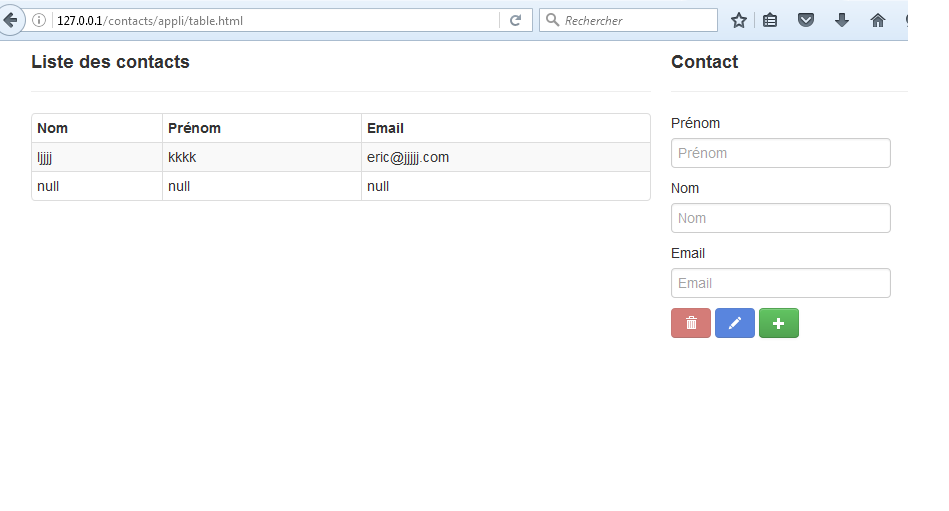
Dernière édition: 17/05/2016 @ 15:50:09

Framework SLIM MVC
Publié le 17/05/2016 @ 15:50:57,
Par ovh(HS pour zion: tiens, le coloriseur syntaxique ne supporte pas le doctype pour le format html  )
)
)Je n'ai rien à voir avec www.ovh.com